Structured logging with Microsoft.Extensions.Logging
Logging uncaught exceptions is one thing. What about all of the log statements that developers need to add today? With our integration with Microsoft.Extensions.Logging, you can log everything from verbose to fatal messages from ASP.NET Core.
Since messages logged through Microsoft.Extensions.Logging goes in the same error log as uncaught errors, existing rules and notifications just work.
The elmah.io integration for Microsoft.Extensions.Logging supports structured logging. If you ever tried scrolling through file-based log files, you know how important being able to separate and search by properties can be.
Breadcrumbs
When backend methods in ASP.NET Core fail, it can be a challenging task to figure out what happened. The cookies, server variables, and similar information logged by elmah.io do not always help to figure out what went wrong. Looking through multiple log statements to see what happened just before the error has been a common practice for years. Until now!
With Breadcrumbs on elmah.io, you can both manually log breadcrumbs in memory and have ASP.NET Core store messages logged through Microsoft.Extensions.Logging and use them as breadcrumbs. When an error is thrown, elmah.io automatically picks up all of the error details as well as the preceding breadcrumbs leading up to the error. This will make it a lot quicker to find, reproduce, and fix errors.
Let your AI agent read your ASP.NET Core errors
Connect Claude Code, Cursor, VS Code or Visual Studio to the elmah.io MCP server. Your agent can list new errors, read the stack trace and request details, check what changed after a deployment, and mark an error as fixed when you ask.
In Claude Code, add the server with one command:
claude mcp add --transport http --client-id claudecode elmahio https://mcp.elmah.io/mcpThe MCP server is included on every plan and is currently in beta. Set up the MCP server.
elmah.io vs. ElmahCore
| Feature | ElmahCore | elmah.io |
|---|---|---|
| Error Logging | ||
| Self-hosted | ||
| Cloud-hosted | ||
| Search | ||
| New error detection | ||
| Error grouping | ||
| Issue tracking | ||
| Microsoft.Extensions.Logging | ||
| Clientside error logging | ||
| Slack/Microsoft Teams/etc. | ||
| Deployment tracking | ||
| Uptime monitoring | ||
| Heartbeats | ||
| AI agent access (MCP server) |
Set up in a few lines
Install the NuGet package, add your API key and log ID, and call UseElmahIo. That is the whole setup.
dotnet add package Elmah.Io.AspNetCorebuilder.Services.AddElmahIo(options =>
{
options.ApiKey = "API_KEY";
options.LogId = new Guid("LOG_ID");
});
// ...
app.UseElmahIo();Call UseElmahIo after UseExceptionHandler and UseAuthentication, and before your endpoints. Your API key and log ID are shown on the install page when you sign up. Read the full setup guide.
How it looks
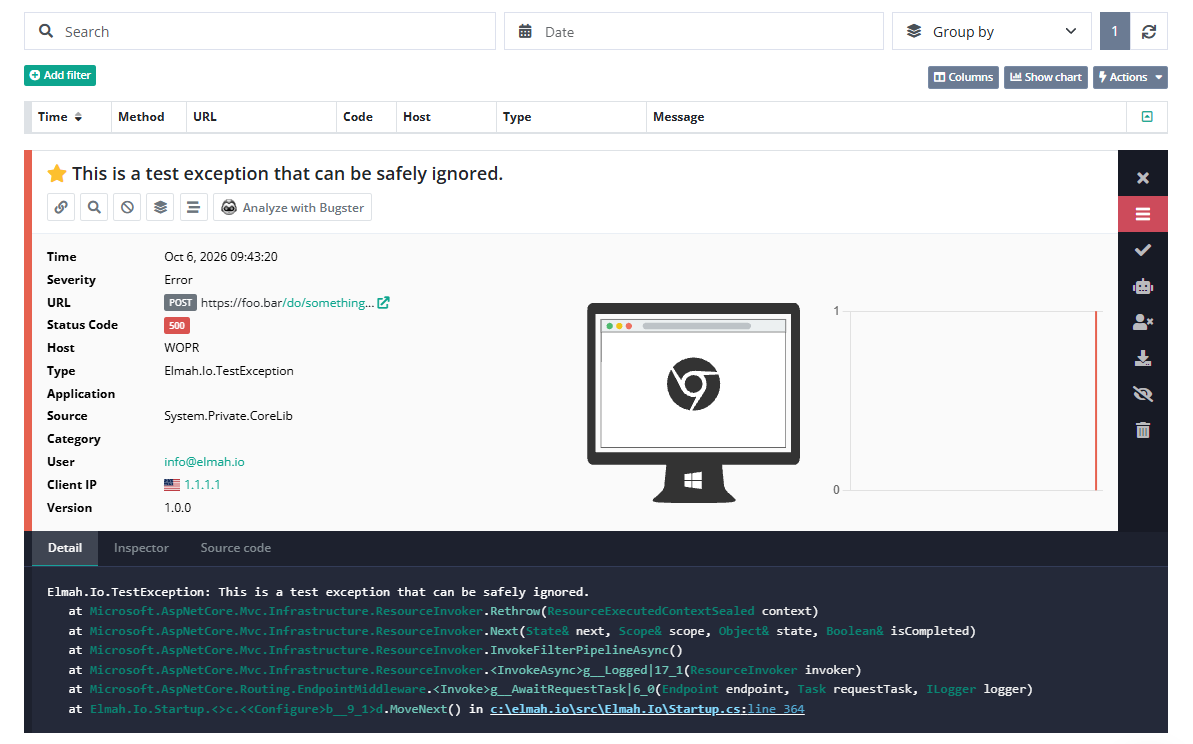
Here is what elmah.io logs for an unhandled exception:
- The request, with URL, status code, cookies, form values and server variables.
- The exception type and the stack trace.
- Breadcrumbs, the log messages that led up to the error.
- Messages from Microsoft.Extensions.Logging in the same log. Failing health checks show up as heartbeats, and deployment tracking shows which release broke what.
Frequently asked questions
Does elmah.io work with minimal APIs?
Yes. UseElmahIo works with minimal APIs, MVC, Razor Pages and Web API controllers. The Elmah.Io.AspNetCore repository has a minimal API sample.
Can I log handled exceptions and ILogger messages too?
Yes. Install Elmah.Io.Extensions.Logging to send ILogger messages to the same log as your uncaught exceptions. Messages logged through ILogger use the same rules and notifications.
How is this different from ElmahCore?
ElmahCore is self-hosted: it runs inside your app and shows errors on a page you host yourself. elmah.io is cloud-hosted and adds search, error grouping, new error detection, notifications, uptime monitoring and AI agent access. See the comparison table above.
Can I use elmah.io next to Application Insights?
Yes. The elmah.io package doesn't depend on Application Insights, so both can run in the same app.
Can my AI coding agent read these errors?
Yes. Connect the elmah.io MCP server to Claude Code, Cursor, VS Code or Visual Studio. It is included on every plan and is currently in beta.