log4net in the Cloud
The elmah.io appender for log4net has been built from the ground up. No cheating using the RemotingAppender to show simple unstructured log messages. This is the real deal! With log4net and elmah.io, all of your log messages go directly to the cloud.
Having log messages, logged through log4net, in the cloud makes it searchable. If you ever tried logging into a remote server and searching through GBs of file-based log messages, you will love log4net with elmah.io.
Structured Logging
By integrating log4net with our API, we make sure that structured data like level, message, and username are kept as individual properties making it searchable on elmah.io. Log messages logged through log4net are on its own not structured data as you know it from similar log frameworks. But with elmah.io's appender for log4net, we extract properties directly from your log message properties. elmah.io takes your log4net logging to the next level by filling in the blanks.
Think of being able to do the following with your current log files:
- Group your log messages by their environment.
- Search for 'some username' in GBs of log messages.
- Send me an email when a System.NullReferenceException is logged.
Custom Properties
Already using log4net Context Properties? Context is extracted before sending off to elmah.io and treated as custom properties with all of the benefits that come with that feature. By logging contextual properties as individual fields, you can perform complex tasks, which is never possible using a log file.
Reserved property names, like User, fill the matching field in elmah.io instead of ending up on the Data tab, and the logger name of log4net becomes the category.
Fully Documented
Not an expert in log4net configuration? No worries, fully documented elmah.io and log4net are available through NuGet. We even provide you with sample code to get up and running. To get a quick demo of the log4net integration for elmah.io, take a quick peek at the video below.
Let's face it, log4net hasn't been the best-documented logging framework out there. We want to help you get started quickly, and provide you with help through our log4net Tutorial. The log4net documentation covers message hooks, ASP.NET Core and troubleshooting too.
Let your AI agent read your log4net errors
Connect Claude Code, Cursor, VS Code or Visual Studio to the elmah.io MCP server. Your agent can list new errors, read the stack trace and message details, check what changed after a deployment, and mark an error as fixed once you have shipped the change.
In Claude Code, add the server with one command:
claude mcp add --transport http --client-id claudecode elmahio https://mcp.elmah.io/mcpThe MCP server is included on every plan and is currently in beta. Set up the MCP server.
Set up in a few lines
Install the NuGet package, enable the XML configurator, add the appender to your web.config or app.config with your API key and log ID, and log as usual.
dotnet add package Elmah.Io.Log4Net[assembly: log4net.Config.XmlConfigurator(Watch = true)]<configuration>
<configSections>
<section name="log4net" type="log4net.Config.Log4NetConfigurationSectionHandler, log4net" />
</configSections>
<log4net>
<appender name="ElmahIoAppender" type="elmah.io.log4net.ElmahIoAppender, elmah.io.log4net">
<logId value="LOG_ID" />
<apiKey value="API_KEY" />
</appender>
<root>
<level value="Info" />
<appender-ref ref="ElmahIoAppender" />
</root>
</log4net>
</configuration>var log = log4net.LogManager.GetLogger(typeof(HomeController));
log.Info("Trying something");
log.Error("Error happening", ex);The root level above sends information, warning, error and fatal messages. Raise it if you only want warnings and above in elmah.io. Your API key and log ID are shown on the install page when you sign up. Read the full setup guide.
How it looks
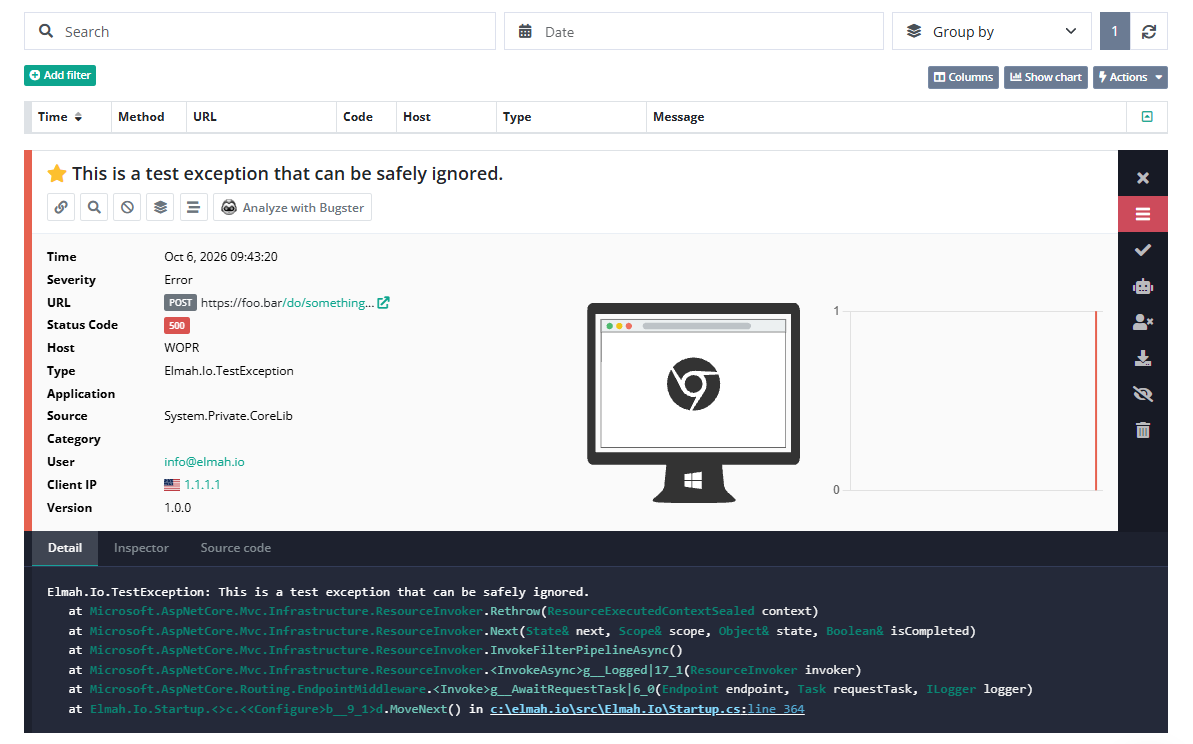
Here is what elmah.io logs for a log4net message:
- The message, with its level and the logger name as the category.
- Context properties from
GlobalContextandThreadContextas their own fields on the Data tab. - Reserved property names fill dedicated fields, for example
User. - The exception type and stack trace when you pass an exception.
Frequently asked questions
Can I keep my existing log4net appenders and add elmah.io?
Yes. Add the elmah.io appender and an appender-ref for it under root, and keep your file, console and other appenders as they are.
How do I avoid sending debug messages?
Set the level on root, or on a single logger. A level of Info sends information, warning, error and fatal messages, and WARN sends warnings and above.
Can I keep the API key and log ID in appSettings?
Yes. Add type="log4net.Util.PatternString" to the logId and apiKey elements and use a value like %appSetting{apiKey}.
Does it work with ASP.NET Core?
Yes. Install Elmah.Io.Log4Net and Microsoft.Extensions.Logging.Log4Net.AspNetCore, and call builder.Logging.AddLog4Net(). Add Elmah.Io.AspNetCore.Log4Net and app.UseElmahIoLog4Net() to include cookies, server variables and other HTTP details.
How do I log an exception?
Pass the exception as the second argument, for example log.Error("Error happening", ex). The exception type and stack trace are logged with the message.
Can my AI coding agent read these errors?
Yes. Connect the elmah.io MCP server to Claude Code, Cursor, VS Code or Visual Studio. It is included on every plan and is currently in beta.