Native Integration
With our native integration explicitly built for both Azure Functions and Isolated Azure Functions, monitoring if your Functions behaves nicely requires a few lines of code only. Errors are automatically sent to elmah.io's servers. You will experience the same rich notifications and apps support as with the website integrations.
Monitoring errors in Functions is one thing. You also want to make sure that your HTTPS-based Functions are available for request and your timed and queue-based Functions are running. With elmah.io Uptime Monitoring, setting up heartbeats notifies you as soon as something isn't working as expected.
Configure in C# or JSON
All configuration is available through both C# and JSON. Using configuration, you can have an elmah.io log per Function or log multiple Functions to the same log. Utilize different log levels to log everything from debug messages to fatal errors.
The range of configuration possibilities doesn't stop here. With Azure Functions v2 and forward, you can use elmah.io's integration with Microsoft.Extensions.Logging. Doing so opens a whole new world of possibilities like logging filters and dependency injection.
Properties from every function
Having a rich set of contextual information available is essential when trying to debug an error from your production environment. Having an error message and a stack trace only, as provided by alternative monitoring platforms, often isn't enough to figure out what went wrong.
With elmah.io's native integration with Azure Functions, we automatically collect properties from FunctionFilterContext and any properties you have added. Make sure to pick a monitoring solution for your Azure Functions that goes the length of managing these things, to make sure that you are in a position to recover from production issues fast.
Know that your functions run
Monitoring errors in functions is one thing. Verifying that functions run and in the expected internal is just as important. With our native integration between Azure Functions and elmah.io Heartbeats, doing just that is easier than ever before.
Set up an expected interval and grace period on elmah.io, include a few lines of code, and we'll take care of the rest. If your Azure Functions stops running or doesn't follow the expected schedule, we'll notify you through one or more methods of choice.
Let your AI agent read your Azure Functions errors
Connect Claude Code, Cursor, VS Code or Visual Studio to the elmah.io MCP server. Your agent can list new errors, read the stack trace and message details, check what changed after a deployment, and mark an error as fixed when you ask.
In Claude Code, add the server with one command:
claude mcp add --transport http --client-id claudecode elmahio https://mcp.elmah.io/mcpThe MCP server is included on every plan and is currently in beta. Set up the MCP server.
Set up in a few lines
Install the NuGet package for Isolated Azure Functions and call AddElmahIo with your API key and log ID.
dotnet add package Elmah.Io.Functions.Isolatedusing Elmah.Io.Functions.Isolated;
builder.AddElmahIo(options =>
{
options.ApiKey = "API_KEY";
options.LogId = new Guid("LOG_ID");
});Uncaught exceptions are logged automatically. Keep the API key and log ID in your app settings instead of in code if you prefer, and use a different log per function app if you like. Using in-process Azure Functions? Install Elmah.Io.Functions instead. Your API key and log ID are shown on the install page when you sign up. Read the full setup guide.
How it looks
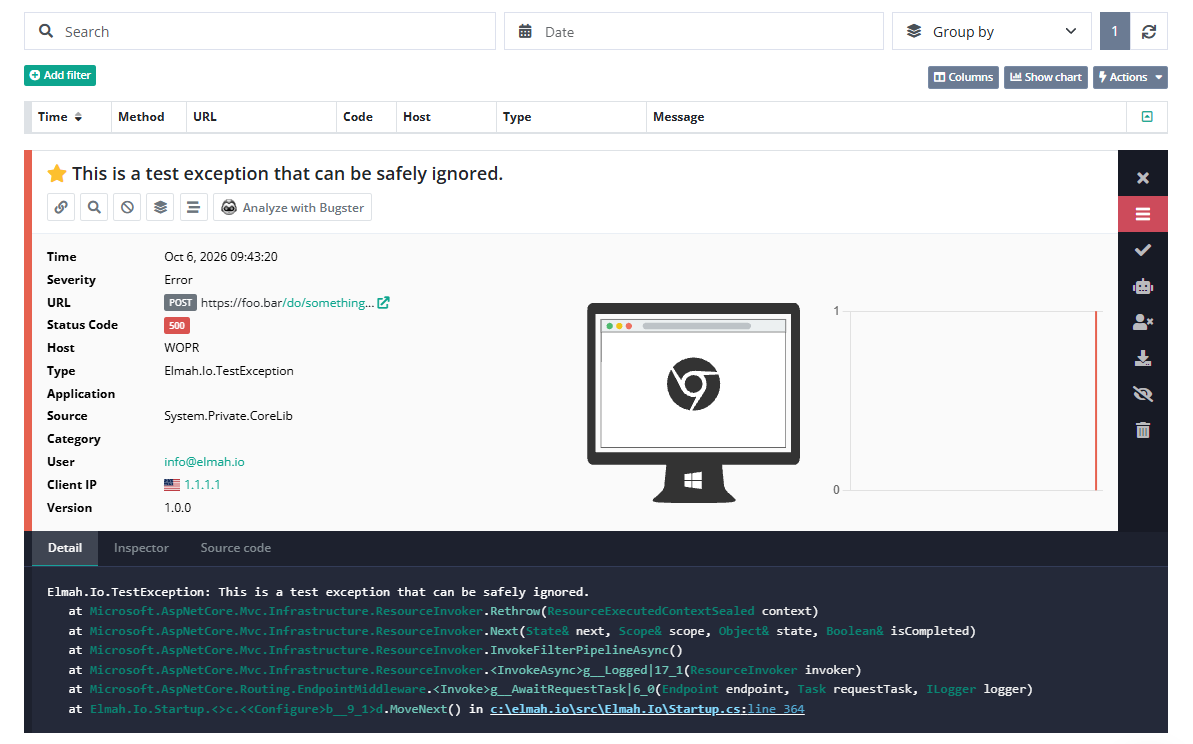
Here is what elmah.io logs for a failing function:
- The exception, with its type and stack trace.
- Properties from the function context and any properties you add.
- Messages logged through
ILogger, with log filtering to control what is sent. - Heartbeats, so you know when a timed or queue-based function stops running.
Frequently asked questions
Does it work with both isolated and in-process Azure Functions?
Yes. Use Elmah.Io.Functions.Isolated for the isolated worker model and Elmah.Io.Functions for in-process functions.
Can I log messages through ILogger?
Yes. The integration with Microsoft.Extensions.Logging lets you log through ILogger and use log filtering, so only the levels you choose are sent to elmah.io.
Can I keep the API key and log ID in app settings?
Yes. Put apiKey and logId in your settings file, in environment variables or in your Azure app settings, and read them when you call AddElmahIo.
How do I know a timed function is still running?
Use elmah.io Heartbeats. Set an expected interval and grace period on elmah.io, include a few lines of code in your function, and you are notified if it stops running or misses its schedule.
Can my AI coding agent read these errors?
Yes. Connect the elmah.io MCP server to Claude Code, Cursor, VS Code or Visual Studio. It is included on every plan and is currently in beta.