Serilog in the Cloud
The elmah.io sink for Serilog sends the events you already log with Serilog to the cloud, where they are searchable in one place and can notify your team about new errors. Add one NuGet package, add the sink to your logger configuration and keep your other sinks as they are.
Like Serilog itself, the sink is built with support for structured log data in mind. Where other sinks simply store a dumb log message, we respect the template and preserve the properties. Configure the sink in C# or in appsettings.json, set a minimum level on the sink to control which messages are sent, and call Log.CloseAndFlush() before your program ends so buffered messages are not lost.
Search by the properties you log
Like any other message logged to elmah.io, everything is searchable through the UI. We even support searching by property names specified inside Serilog messages. How would you like to group errors by user in your current text-based log files? In elmah.io that is possible using a single mouse-click.
Full-text search and advanced search filters make it possible to use elmah.io as an issue tracker. The huge benefit is that Serilog will automatically fill your issue tracker with bugs, rather than relying on your test team or, in worst case, your users to report bugs.
Enrichers and LogContext work as they do today
One of many nice features of Serilog is the option of enriching log messages with contextual information. Enrichers are fully supported by the elmah.io sink and the enriched data can be made searchable. Structured properties embedded inside Serilog log messages, are automatically extracted and placed inside the right fields on elmah.io.
Properties from Enrich.WithProperty, Enrich.FromLogContext and LogContext.PushProperty, and from the message template, end up on the Data tab of each message. Reserved property names like User fill the dedicated fields in elmah.io, so you can filter and group by values you already log. Having log messages as documents rather than concatenated lines of text, open a whole new window to your log messages.
Fully documented
Not an expert in Serilog? No worries, fully documented elmah.io and Serilog are available through NuGet. We even provide you with sample code to get up and running. Everything from simple console applications to modern web applications is supported.
The documentation covers the whole sink, not only the basic setup. Use message hooks to decorate every message with a version number or attach source code, filter out messages you do not want to store, and handle errors if logging to elmah.io fails. Remove sensitive data from your properties before it leaves your application, and map Serilog's SourceContext to the Category field to group messages by class or namespace. Prefer configuration files? The sink works from appsettings.json, and Serilog.Exceptions adds extended exception details.
Read the Serilog documentation or browse the samples on GitHub.
Let your AI agent read your Serilog errors
Connect Claude Code, Cursor, VS Code or Visual Studio to the elmah.io MCP server. Your agent can list new errors, read the stack trace and message details, check what changed after a deployment, and mark an error as fixed when you ask.
In Claude Code, add the server with one command:
claude mcp add --transport http --client-id claudecode elmahio https://mcp.elmah.io/mcpThe MCP server is included on every plan and is currently in beta. Set up the MCP server.
Set up in a few lines
Install the NuGet package, configure the sink with your API key and log ID, and log as usual.
dotnet add package Serilog.Sinks.ElmahIoLog.Logger = new LoggerConfiguration()
.WriteTo.ElmahIo(new ElmahIoSinkOptions("API_KEY", new Guid("LOG_ID")))
.CreateLogger();
Log.Error(exception, "Payment failed for {OrderId}", orderId);
Log.CloseAndFlush();Call Log.CloseAndFlush() before your program ends, so buffered messages are sent. Only want warnings and above in elmah.io? Set MinimumLogEventLevel on the sink options and keep your other sinks as verbose as you like. Prefer config files? The sink also works from appsettings.json. Your API key and log ID are shown on the install page when you sign up. Read the full setup guide.
How it looks
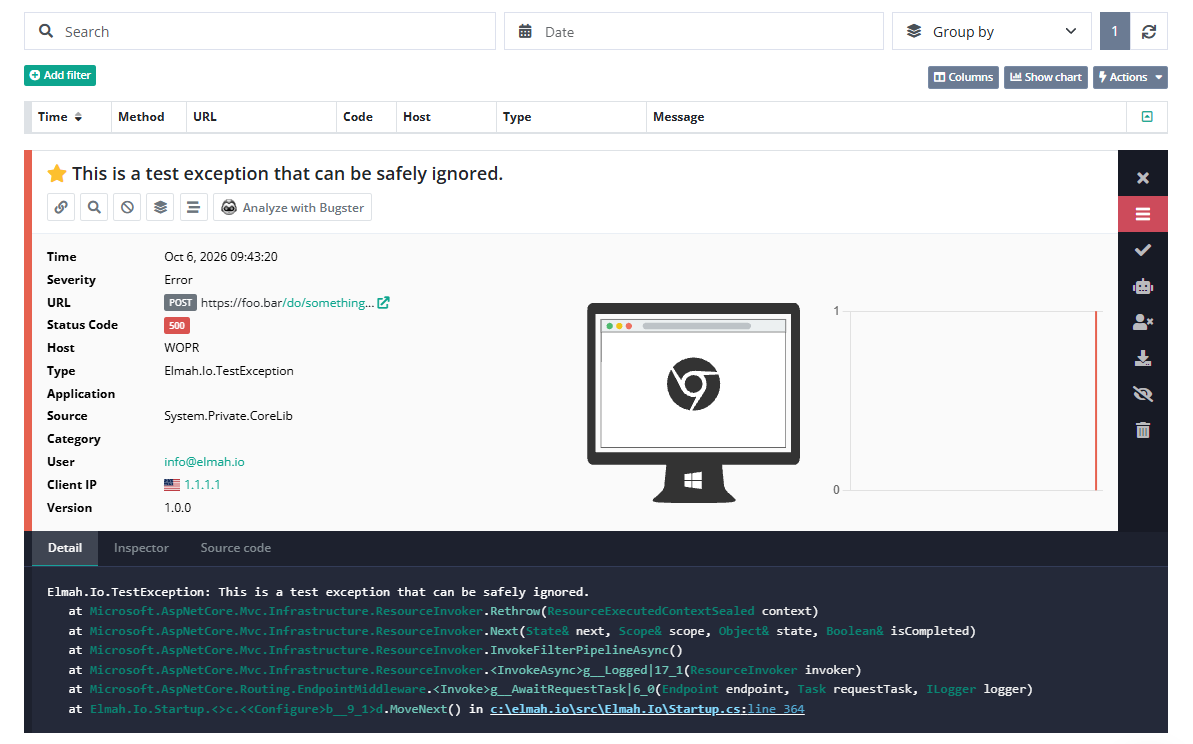
Here is what elmah.io logs for a Serilog event:
- The message and the message template.
- Every property as its own field. Properties from the template, enrichers and
LogContextare on the Data tab. - Reserved property names fill dedicated fields, for example
User. - The exception type and stack trace when you pass an exception.
Frequently asked questions
Can I keep my file or console sink and add elmah.io?
Yes. Serilog sinks are additive, so keep your existing sinks and add WriteTo.ElmahIo(...) next to them.
How do I avoid sending debug and information events?
Set MinimumLogEventLevel on ElmahIoSinkOptions, for example to Warning, or set MinimumLevel in appsettings.json.
Can I configure the sink in appsettings.json?
Yes, with the Serilog.Settings.Configuration package. Spell the apiKey and logId arguments with a lowercase first character.
How do I log an exception?
Pass it as the first argument, for example Log.Error(e, "The actual error message"). The exception type and stack trace are logged with the message.
Can my AI coding agent read these errors?
Yes. Connect the elmah.io MCP server to Claude Code, Cursor, VS Code or Visual Studio. It is included on every plan and is currently in beta.