Microsoft.Extensions.Logging in the Cloud
Microsoft.Extensions.Logging is both a logging framework and an abstraction on top of other logging frameworks like Serilog and log4net. The elmah.io logger provider sends the messages you log through ILogger to the cloud, where they are searchable in one place and your team is notified when a new error shows up.
It works in ASP.NET Core, in console applications and in anything else that uses the .NET generic host, like Worker Services. Add one NuGet package and a few lines to Program.cs.
Warnings and up, by default
elmah.io is an error management system, and not a place for millions of debug messages. That is why the logger only sends warnings, errors and fatal messages out of the box. Messages below that level are left to your other providers, like the console.
Need more? Add a filter for the elmah.io provider to send information messages too, or set the minimum level in appsettings.json under a logger named ElmahIo.
Properties, scopes and categories
Properties from logging scopes end up on the Data tab, as individual fields you can search by name. Wrap your logging code in BeginScope to add a user ID or a correlation ID to every message inside it.
The category is set from the type of a typed logger, ILogger<MyType>, and shows up as the Category field. Source-generated log methods with the LoggerMessage attribute are supported, and so is [LogProperties] from .NET 8.
HTTP context in ASP.NET Core
Microsoft.Extensions.Logging does not know that it runs inside a web server, so URL, status code and cookies are not included out of the box. Install the Elmah.Io.AspNetCore.ExtensionsLogging package and call UseElmahIoExtensionsLogging, and your log messages carry the context of the request.
Form values from POST requests are included too. Multipart content is skipped by default, and you can switch form logging off for endpoints with sensitive data.
Console apps and Worker Services
Outside ASP.NET Core, add the provider to a ServiceCollection or the logging builder of the host, and get a logger from it. Dispose the logger factory before the application exits, so elmah.io can store the last messages.
Running background workers? Pair the logging with heartbeats, so you also hear about workers that stop without logging anything.
Fully documented
The documentation covers every part of the integration: ASP.NET Core, console applications, scopes, LoggerMessage, including source code on messages, application names, filtering, logging through a proxy and troubleshooting.
Read the Microsoft.Extensions.Logging documentation or browse the samples on GitHub.
Let your AI agent read your ILogger errors
Connect Claude Code, Cursor, VS Code or Visual Studio to the elmah.io MCP server. Your agent can list new errors, read the stack trace and message details, check what changed after a deployment, and mark an error as fixed once you have shipped the change.
In Claude Code, add the server with one command:
claude mcp add --transport http --client-id claudecode elmahio https://mcp.elmah.io/mcpThe MCP server is included on every plan and is currently in beta. Set up the MCP server.
Set up in a few lines
Install the NuGet package, add the logger in Program.cs with your API key and log ID, and log through ILogger as usual.
dotnet add package Elmah.Io.Extensions.Loggingusing Elmah.Io.Extensions.Logging;
builder.Logging.AddElmahIo(options =>
{
options.ApiKey = "API_KEY";
options.LogId = new Guid("LOG_ID");
});
builder.Logging.AddFilter<ElmahIoLoggerProvider>(null, LogLevel.Warning);public class HomeController(ILogger<HomeController> logger) : Controller
{
public IActionResult Index()
{
logger.LogWarning("Request to index");
return View();
}
}The filter above sends warnings and above, which is also the default. Raise or lower it to match what you want in elmah.io. Your API key and log ID are shown on the install page when you sign up. Read the full setup guide.
How it looks
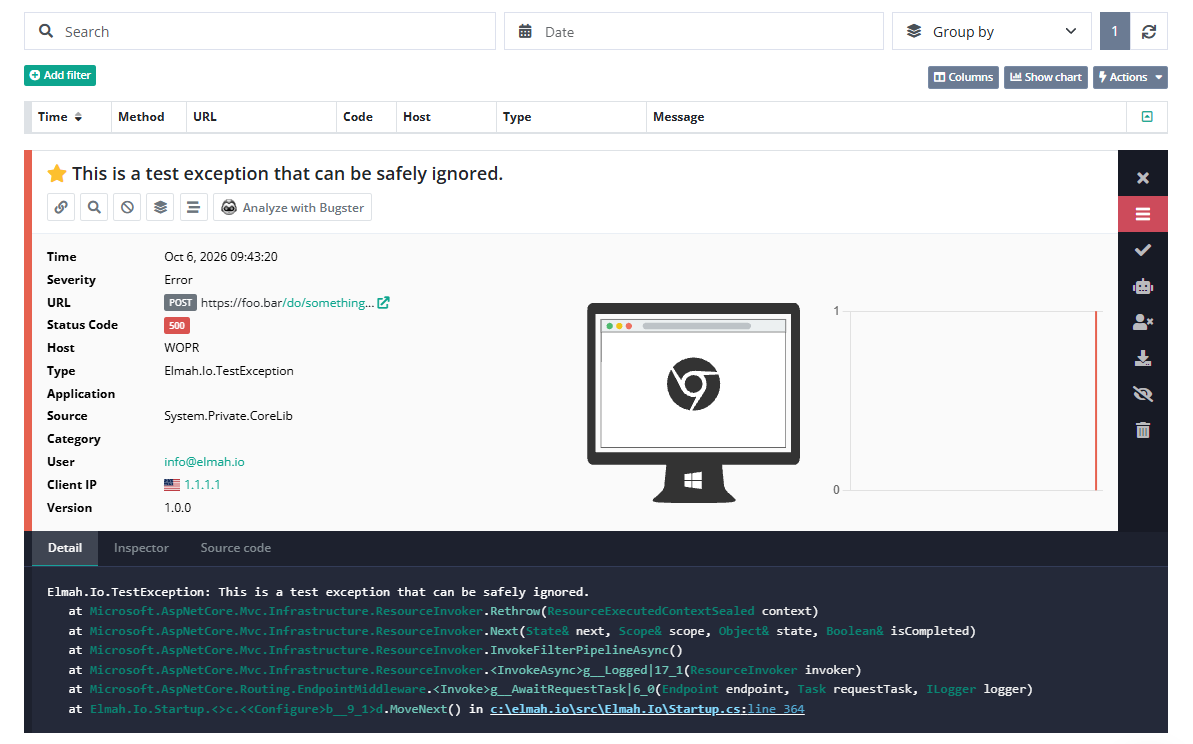
Here is what elmah.io logs for an ILogger message:
- The message, with its severity and the category of the logger.
- Scope properties and structured values as fields on the Data tab.
- The exception type and stack trace when you pass an exception.
- In ASP.NET Core with the extra package, the URL, the status code, cookies and form values of the request.
Frequently asked questions
How is this different from Elmah.Io.AspNetCore?
Elmah.Io.AspNetCore logs uncaught exceptions with the details of the request. The ILogger provider logs the messages you write yourself. Use both to get everything in the same log.
Why do I only see warnings and above?
The provider only sends warnings, errors and fatal messages by default. Add builder.Logging.AddFilter<ElmahIoLoggerProvider>(null, LogLevel.Information) to include information messages.
How do I add custom properties to messages?
Wrap your logging code in a scope with BeginScope and pass a dictionary. The values appear on the Data tab of each message logged inside the scope.
Can I configure the logger in appsettings.json?
Yes. Set the minimum level under Logging:ElmahIo:LogLevel and the application name in an ElmahIo section, and call AddConfiguration on the logging builder.
Can my AI coding agent read these errors?
Yes. Connect the elmah.io MCP server to Claude Code, Cursor, VS Code or Visual Studio. It is included on every plan and is currently in beta.